Most reply syncs fail on one decision: which replies deserve a deal.
To sync cold email replies to HubSpot, send reply and lead-status events from your sending tool to a webhook. Match each one to a contact by email and log it on the record. Create a deal only when a lead is labeled interested. Out-of-office, wrong-person, and unsubscribe replies update properties and nothing else.
Skip that last rule and the pipeline fills with phantom deals. Every auto-reply becomes an "opportunity," reps stop trusting the board, and reporting turns to noise. Below are the rules, the fields, and the places this sync usually breaks.
What is a cold email reply sync?
A cold email reply sync is an automation that sends reply and status events from your sending tool, such as Instantly or Smartlead, into HubSpot. It matches each event to a contact and company. Fixed rules then update properties, tasks, and deals, so reps work from the CRM instead of a sequencer inbox.
Sending tools are built to send. HubSpot is built to track relationships and pipeline. The sync is the contract between them, and most of the work is deciding what that contract says.
Most tools handle one direction out of the box. Instantly's own guide says its native connection imports HubSpot lists. Pushing events back takes webhooks plus an app or automation tool like OutboundSync, Zapier, or Make.
What do you need before you start?
Check four things first:
- A sender that emits webhooks. Instantly webhooks need the Hyper Growth plan or above, per Hookdeck's guide (as of November 2026, so re-check pricing).
- HubSpot permissions to create properties, workflows, and associations.
- A handler that receives the webhook. n8n, Make, Zapier, or a small script all work.
- A field owner list, written down. For every property, decide who writes it: HubSpot or the sender. Never both.
The Log, Label, Route, Suppress model
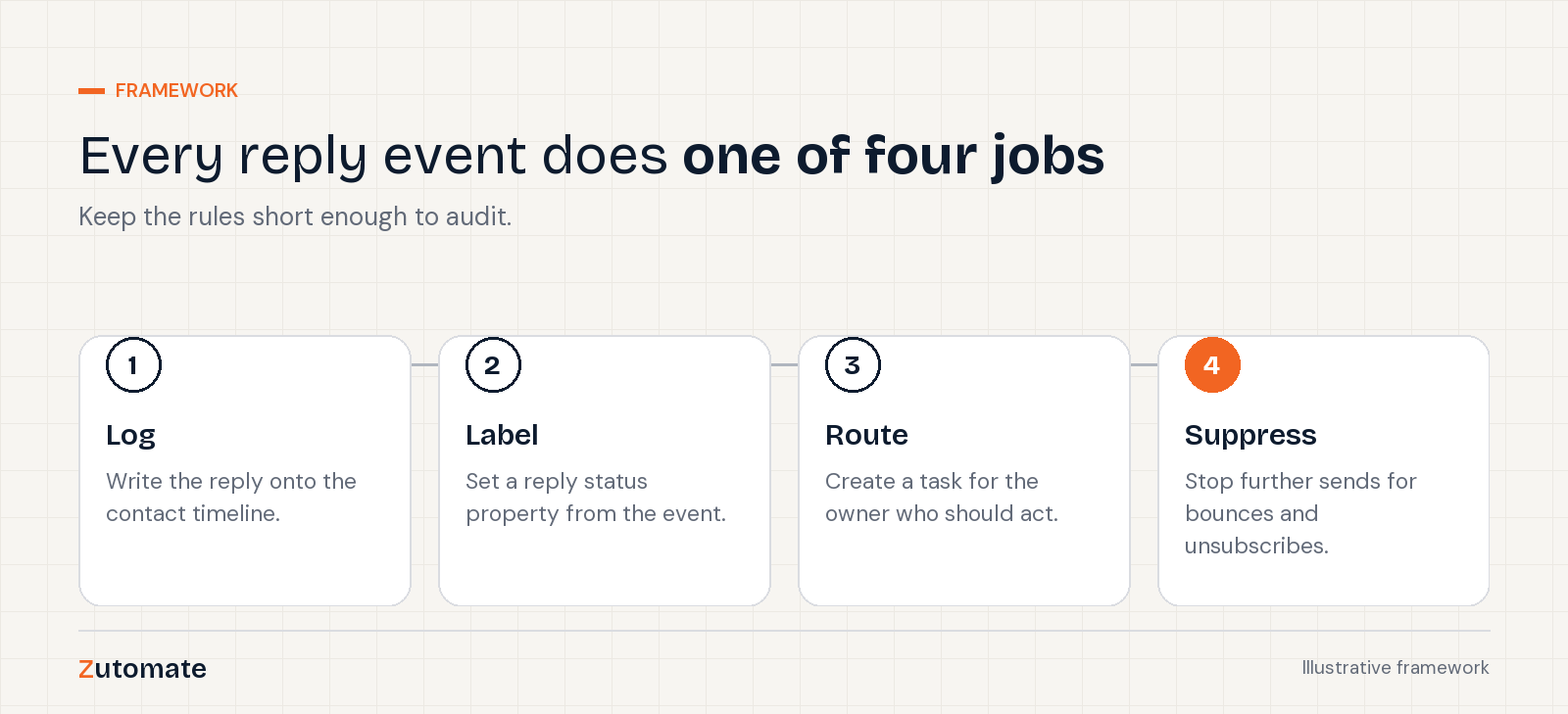
Every event your handler accepts from a cold email campaign should do at least one of four jobs. We call this the Log, Label, Route, Suppress model, because it keeps the rules short enough to audit.
| Job | What it means | Where it lands in HubSpot |
|---|---|---|
| Log | Record that the reply happened, with the text | Contact timeline (note or email activity) |
| Label | Store what kind of reply it was | Contact properties |
| Route | Decide who acts next and how | Task, owner, deal |
| Suppress | Stop emailing people who shouldn't get email | hs_email_optout and the sender's blocklist |
If an event can't be mapped to one of the four jobs, don't subscribe to it. Opens and clicks are the usual offenders. They flood the timeline, and open tracking is too noisy to base CRM decisions on.
How do you build it, step by step?
- Write the field owners down. HubSpot owns
lifecyclestage, the contact owner, and the deal stage. The sender owns campaign data and reply status. One writer per field keeps the two systems from fighting. - Create the custom properties from the table further down. Match the dropdown values to the sender's reply labels, so the mapping stays one-to-one.
- Subscribe to specific events. Pick the ones in the map below, not every event. Instantly doesn't sign webhook payloads, so add a custom secret header and reject any request without it.
- Build an idempotency key. Instantly's payload has no event ID. Combine
event_type,timestamp,lead_email, andcampaign_id, store the result on the contact, and skip repeats. Any retry, or any resend you trigger while debugging, would duplicate events without it. - Match by email, then associate the company by domain. Search HubSpot for the contact by email, never by name. Associate the company through the email domain and skip free-mail domains like gmail.com. Creating companies from name text is how duplicates start.
- Log the reply, then set properties. Write the reply text as a note or email activity on the contact. Then update the status and date. Log first, so the record still makes sense if a property write fails.
- Apply the deal rule. A task or a deal, decided by the four checks in the deal section below.
- Mirror suppression both ways. An unsubscribe in the sender sets
hs_email_optoutin HubSpot. An opt-out or customer flag in HubSpot goes back to the sender's blocklist.
Which Instantly event should trigger which HubSpot action?
Here's the map we'd start from. The event names come from Instantly's webhook docs, so swap in your own sender's equivalents if you use another tool.
Event (event_type) | What it means | HubSpot action | Opens a deal? |
|---|---|---|---|
reply_received | Any reply, not yet labeled | Log note, set cold_reply_status to replied, update last reply date | No |
lead_interested | Someone labeled the reply as interested | Set status to interested, create a same-day task, run the deal rule | Only if all four checks pass |
lead_neutral | Question or unclear reply | Log note, add to a review queue | No |
lead_not_interested | A clear no | Set status, no task | No |
lead_out_of_office | Auto-reply or OOO | Set status, no task | No |
lead_wrong_person | Right company, wrong contact | Set status, task to find the right contact | No |
lead_unsubscribed | Asked to be removed | Set hs_email_optout to true, set status | No |
email_bounced | Address failed | Set status to bounced, flag the email as invalid | No |
lead_meeting_booked | Meeting on the calendar | Advance the open deal, or create one if none exists | Yes, if missing |
Which custom properties does the sync need?
Five custom properties cover most builds. The names below are suggestions, so rename them to fit your portal.
| Property label | Internal name (suggested) | Type | Written by |
|---|---|---|---|
| Cold reply status | cold_reply_status | Dropdown | Sync |
| Last cold reply date | cold_reply_last_date | Date | Sync |
| Cold campaign name | cold_campaign_name | Single-line text | Sync |
| Cold campaign ID | cold_campaign_id | Single-line text | Sync |
| Last event key | cold_last_event_key | Single-line text | Sync (idempotency) |
| Lifecycle stage | lifecyclestage | HubSpot default | HubSpot workflows only |
| Opted out of all email | hs_email_optout | HubSpot default | Sync and HubSpot |
| Contact owner | hubspot_owner_id | HubSpot default | HubSpot routing |
One gotcha: HubSpot's contacts API docs say enumeration properties must be set by internal name, not label. Your handler should write the internal values, or the update fails.
When should a reply create a deal in HubSpot?
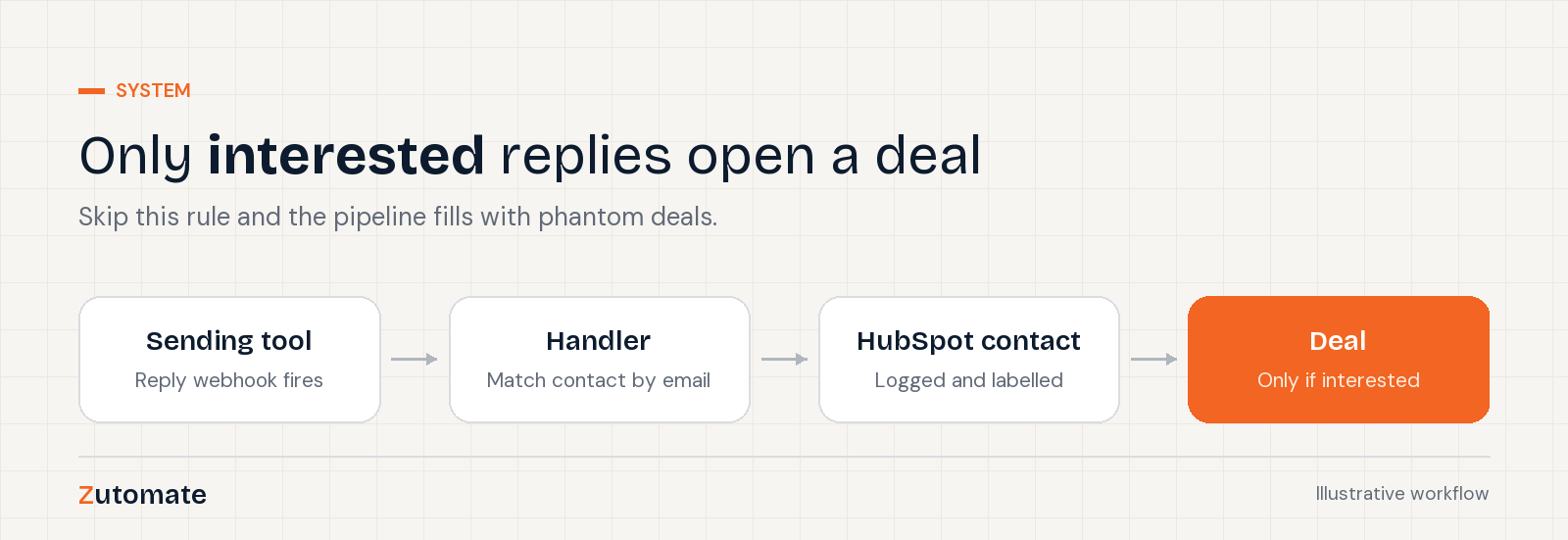
Our rule is simple: a deal needs a human decision, not just a reply. The reply_received event only proves someone typed something. By contrast, lead_interested means a person, or an AI label you trust, judged the reply as real interest.
Open a deal only when all four of these are true:
- The event is
lead_interested. - No open deal exists for the company.
- The company isn't already a customer.
- HubSpot can assign an owner.
If any check fails, create a task for the owner or an ops queue instead. That keeps duplicate deals out of the pipeline and still puts a human on the reply. Who becomes the owner is a routing question. Our HubSpot lead routing audit checklist covers assignment precedence, existing ownership, and fallbacks.
If your stages and ownership rules aren't settled yet, fix that first. It's the core of our HubSpot RevOps work, and no sync can fix a pipeline nobody agrees on.
Handoffs like this are a core part of the outbound and RevOps systems we build. One example is the system that generated $85K in pipeline for GOSO in 3 months. Results like that depend on the offer, the ICP, and list quality. We'd rather show you how the system works than promise a number.
Worked example: 45 replies, 7 deals
Say you send 1,500 cold emails in a week and 45 replies come back. These numbers are invented to show the routing, not a benchmark.
| Reply type | Count | What the sync does |
|---|---|---|
| Out-of-office or auto-reply | 12 | Status set to OOO, no task |
| Not interested or unsubscribe | 10 | Status set, opt-out flag for unsubscribes |
| Wrong person | 5 | Task to find the right contact |
| Neutral questions | 9 | Note logged, sent to a review queue |
| Interested | 9 | 7 new deals, 2 tasks (open deal already exists) |
A sync that opens a deal for every reply creates 45 deals. This one creates 7, and the other 38 replies still leave a labeled record. Reps see a board they can trust, and managers can report reply-to-deal rate by campaign.
Where does a reply sync break?
Most cold email sync failures are boring. These are the ones we'd check first:
- Duplicate notes. With no event ID in the payload, a retry looks like a new reply. The idempotency key from step 4 fixes it.
- Event names that don't match. Instantly's events guide lists
link_clickedandauto_reply_received, but its API listsemail_link_clickedand has no auto-reply event. A handler waiting for an event that never arrives fails silently. Custom reply labels also add their own event types, so a strict allow-list drops them without warning. - Forwarded replies. A reply from a different address won't match by email. Send it to an unmatched queue, such as a HubSpot task or a Slack alert, and let a person decide. Auto-creating a contact there is how junk records get in.
- Duplicate companies. Name matching creates them and domain matching prevents most. Our Clay-to-HubSpot enrichment workflow covers the same dedupe logic from the enrichment side.
- One-way suppression. An unsubscribe that lands in only one tool means the other keeps emailing. Mirror it in both directions.
- Lifecycle stage overwrites. If the sync writes
lifecyclestage, it fights your HubSpot workflows. Let workflows move the stage after the status changes.
Reference points (as of November 2026)
Treat these as reference points, not targets. Your baseline depends on your market and how clean your data is.
| Item | Detail | Source | Re-check before publishing |
|---|---|---|---|
| Instantly webhook plan requirement | Hyper Growth plan or above | Hookdeck guide to Instantly webhooks | Yes |
| Payload signing | Not signed, custom header only | Hookdeck guide | Yes |
| Event ID in payload | None | Hookdeck guide | Yes |
| Event naming | Guide and API lists differ | Instantly webhook docs and Hookdeck | Yes |
| HubSpot dropdown values | Set by internal name, not label | HubSpot contacts API docs | No |
| Average cold email reply rate | About 3.43% | Instantly 2026 benchmark, as cited by Prospeo | Yes |
| Share of emails that become booked meetings | 0.5% to 2% | Instantly, as cited by Prospeo | Yes |
Key Takeaways
- A cold email reply sync should log, label, route, and suppress. Every event you subscribe to should do at least one of those jobs.
- Open a HubSpot deal only when a lead is labeled interested. The company must have no open deal, not be a customer, and have an assignable owner.
- Instantly's webhook payloads carry no event ID. Build an idempotency key from event type, timestamp, lead email, and campaign ID to stop duplicate records.
- Match contacts by email and companies by domain, never by name, to keep duplicate HubSpot records out.
- Mirror unsubscribes in both directions so neither tool keeps emailing someone who opted out.
Frequently Asked Questions
Does Instantly have a native HubSpot integration?
Yes, for importing HubSpot lists into campaigns, according to Instantly's own guide. Pushing replies and status changes back into HubSpot takes webhooks. Pair them with an app like OutboundSync, a tool like Zapier or Make, or your own handler.
Should a cold email reply create a deal in HubSpot?
Not by itself. A reply only proves someone wrote back. Create a deal when a lead is labeled interested and the company has no open deal and isn't a customer. In every other case, create a task or just log the reply.
How do I log cold email replies in HubSpot without duplicates?
Match the contact by email, then store an idempotency key on the record. Instantly's payload has no event ID, so build the key from event type, timestamp, lead email, and campaign ID. Then skip any event you've already stored.
Do I need OutboundSync or Zapier to sync replies?
No. Any handler that can receive a webhook and call HubSpot's API works, including n8n, Make, or a small script. Apps like OutboundSync save build time. A custom handler gives you more control over matching and deal rules.
What should happen when a lead unsubscribes?
Set hs_email_optout to true in HubSpot, update the reply status, and stop the contact in the sender. Then push HubSpot opt-outs back to the sender's blocklist, so the rule holds in both directions.
Want this built and maintained for you? Book your strategy call.
Read More
- Cold email infrastructure checklist: sender authentication, suppression, and campaign monitoring.
- Signal-based outbound trigger matrix: which signals qualify for outreach and what happens next.
- HubSpot RevOps playbook: CRM structure, lifecycle stages, data quality, and reporting.