Clay and HubSpot don't compete for the same job. Clay is where you source, enrich, and score accounts before anyone talks to them. HubSpot is where the records, owners, lifecycle stages, and reports live once they do. Most B2B teams need both. Most of the pain comes from asking one tool to do the other's job.
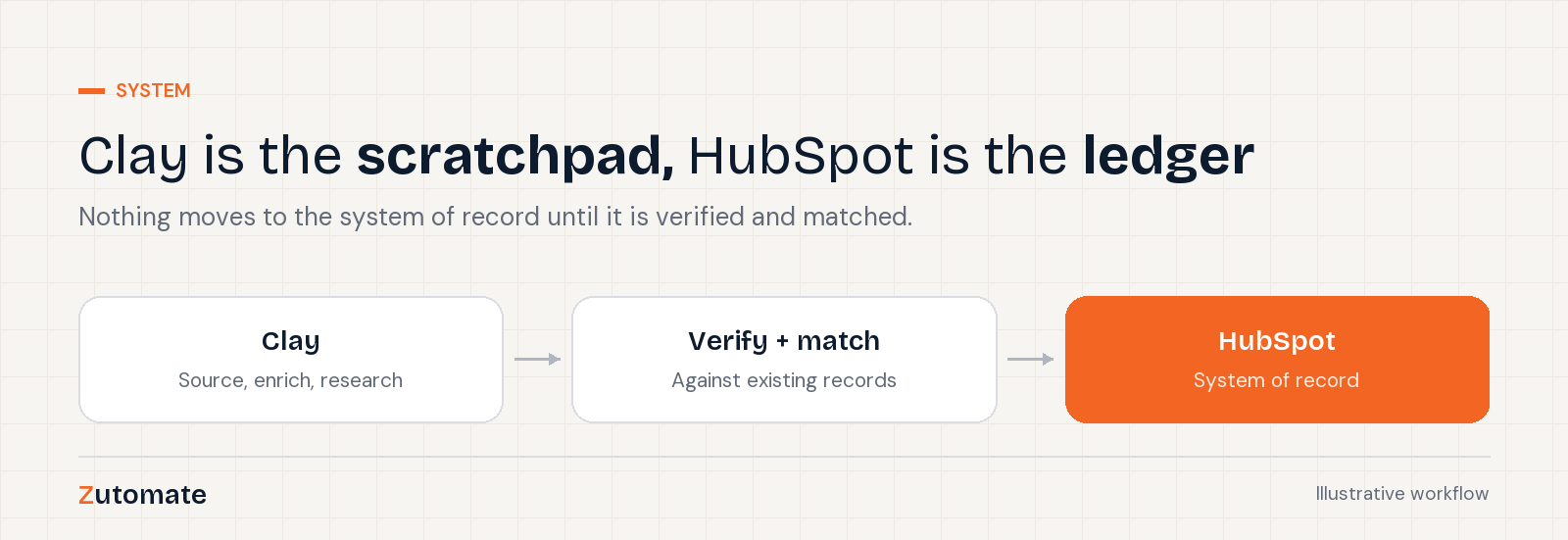
The short answer: Clay is the scratchpad, HubSpot is the ledger
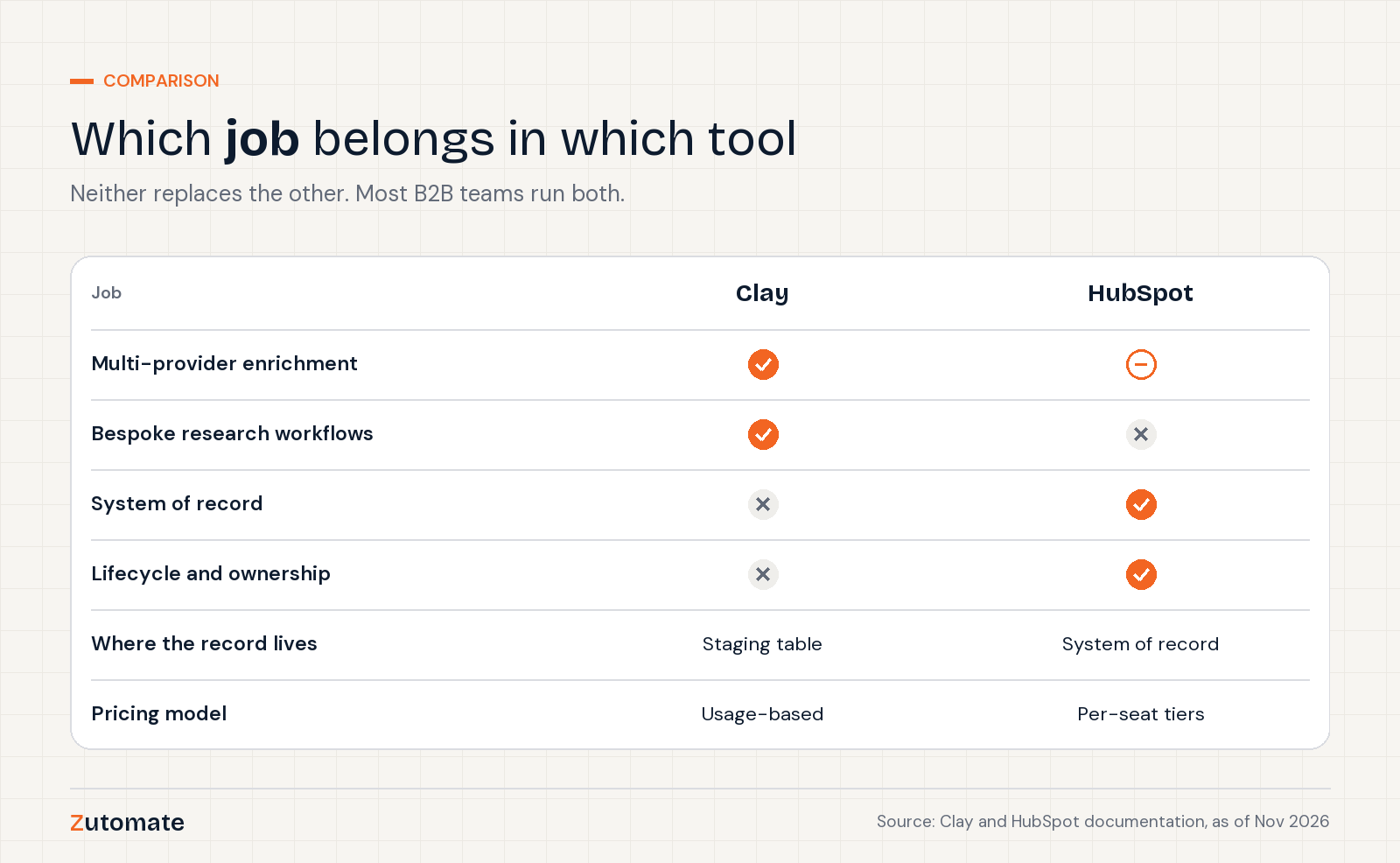
Clay vs HubSpot is a comparison of two different layers of a B2B go-to-market stack. Clay is a data workbench: it pulls leads and company data from many providers, enriches rows, and runs AI research. HubSpot is a CRM: it stores contacts, companies, deals, and activity, and it runs routing, lifecycle stages, sequences, and reporting.
We think of it as the scratchpad and ledger model.
The scratchpad (Clay) is messy on purpose. Rows are cheap to redo, experiments are fine, and nothing there is anyone's source of truth. The ledger (HubSpot) is the opposite, because every write is permanent and visible to every user. So only verified data belongs there.
That gives you one rule. Nothing moves from the scratchpad to the ledger until it is verified, matched to an existing record, and worth a rep's attention.
Clay vs HubSpot at a glance
| Clay | HubSpot | |
|---|---|---|
| Core job | Source and enrich data, run research workflows | Store records, route leads, run the sales process, report |
| Where data comes from | Many third-party providers plus your own sources | What you and your team create, import, or sync in |
| Source of truth? | No | Yes |
| Best at | Waterfall enrichment, AI research, list building | Lifecycle stages, ownership, sequences, reporting |
| Weak at | Being a system of record, activity tracking | Multi-provider enrichment, bespoke research workflows |
| Pricing model | Usage-based: actions and data credits | Per-seat tiers by Hub, with onboarding fees on higher tiers |
| Who usually runs it | GTM engineer or RevOps builder | RevOps, sales ops, and the reps |
Pricing models change often, so check both vendors' pricing pages before you budget. We list the figures we could verify, with dates, in the reference table further down.
Which jobs go where
Each row below is a job we'd assign to one tool by default. The last column is the reason, because the reason is what lets you decide the edge cases yourself.
| Job | Clay | HubSpot | Why |
|---|---|---|---|
| Build a net-new prospect list | Owns it | Receives only rows that pass | Most prospects never become records. Keep them out of the CRM. |
| Waterfall enrichment (email, phone, firmographics) | Owns it | Stores the verified result | Clay can query many providers in order. HubSpot shouldn't hold the unverified attempts. |
| AI research columns (website, hiring, news) | Owns it | Stores a short summary property if reps need it | Research output is bulky and disposable. |
| ICP fit scoring | Computes it | Stores the final tier in one property | Routing and reports need one clean field, not ten inputs. |
| Duplicate matching | Checks before writing | Owns final identity (record ID) | The record ID is the only reliable join key. |
| Lead routing and ownership | Never | Owns it | Owners and territories change. Routing should live where reps are managed. |
| Lifecycle stage | Never writes it | Owns it | Reps and workflows change it. A table refresh must not overwrite it. |
| Signal monitoring (job changes, funding, hiring) | Detects | Creates the task or updates a property | Detection is cheap. Acting on it needs an owner. |
| 1:1 rep outreach and meetings | Prepares the context | Runs sequences, logs activity | Activity history belongs in the ledger. |
| High-volume cold email | Prepares the list | Logs replies and meetings | Volume sending usually runs on dedicated sending infrastructure. See our cold email infrastructure checklist. |
| Reporting and attribution | Never | Owns it | Reports need one source of truth. |
If a job isn't on this list, ask one question: does a person need to trust this field next quarter? If yes, it goes in HubSpot. If it's a draft, an experiment, or a lookup, it stays in Clay, because nobody will miss it.
HubSpot's own demand team follows a version of this. In Clay's write-up of how HubSpot runs Clay, experimental data stays in Clay's environment, and only the highly relevant fields sync back to keep the CRM lean.
The handoff: how to write from Clay to HubSpot without making a mess
Most Clay vs HubSpot comparisons stop at features, but the real work is the handoff. So here is the sequence we use. For a full walkthrough, see our Clay-to-HubSpot enrichment workflow.
- Carry the HubSpot record ID on every row. Without it, every write is a guess about who the record belongs to.
- Enrich only the gaps. Waterfall enrichment (asking providers one by one until one returns a verified value) is where credits go, so don't re-find fields HubSpot already holds and reps have verified.
- Verify before you write. A skipped row in Clay costs nothing. A bounced address in HubSpot is hard to clean.
- Use Update for existing records and Create only for net-new ones. Update keyed on the record ID lands on the right object.
- Keep blank values from overwriting good data. In Clay's HubSpot actions, Update ignores blank values by default. Don't turn that off unless you mean to.
- Stamp the source and the date. A
last_enriched_atproperty tells you what to refresh and what each enrichment cost. - Protect the fields reps own. Lifecycle stage and owner never get written from Clay.
- Re-enrich on a schedule. Work from the stamped date, with shorter windows for open deals and active accounts.
An illustrative field mapping
The property names below are examples, not a spec. Match them to your own portal.
| Clay column | HubSpot property | Write rule |
|---|---|---|
verified_email | Write only if empty or verified and different | |
direct_phone | Phone number | Update if changed |
employee_count | Number of employees | Update if changed |
industry_normalized | Industry | Map to HubSpot's allowed values first |
icp_fit_tier | Custom: icp_fit_tier | Always overwrite |
enrichment_source | Custom: enrichment_source | Always overwrite |
last_enriched_at | Custom: last_enriched_at | Always overwrite |
| Lifecycle stage | Lifecycle stage | Never write from Clay |
| Owner | Contact owner | Never write from Clay |
Where it breaks
Every Clay and HubSpot setup hits a few of these, so it's worth knowing them up front.
HubSpot API limits cap how fast you can write. On privately distributed apps, HubSpot allows 100 requests per 10 seconds on Free and Starter, and 190 on Professional and Enterprise. Daily limits sit at 250,000, 625,000, and 1,000,000 requests per account by tier (as of November 2026). A big backfill has to be paced or batched.
Duplicates come from matching on the wrong key. Clay's HubSpot actions reduce company domains to the root domain by default. That helps matching, but it also means a subdomain you wanted to keep gets dropped unless you change the setting. This is why the dedupe step starts with the record ID, not the domain.
Property sprawl makes the CRM unusable. HubSpot's own team reports a single contact carrying 1,034 properties and gives reps a curated view. Writing every enrichment field back repeats that problem in your portal.
Credits get spent on records no one will touch. Enrich only records that meet your ICP rules. A row that fails the fit check shouldn't reach a paid provider.
Some actions have limits that surprise people. Clay's Look up object returns 10 results by default and 200 at most. Add record to list works only with static lists, because HubSpot recalculates active list membership itself.
Plan gating. Clay's pricing page lists CRM integrations on its Growth and Enterprise plans, not on Free or Launch. Below that, teams use CSV imports, webhooks, or tools like Zapier and Make.
Clay, HubSpot, or both: a rule of thumb by stage
These thresholds are our judgment, not a standard. Adjust for your sales motion.
One to five people selling. Start with HubSpot's CRM for the records and use Clay to build and enrich lists. Move rows in by CSV or webhook at first. You don't need the native integration yet, because a clean manual import beats an automated mess.
Five to twenty reps. Use both, with the native integration, a record ID on every row, and the write rules above. Routing, lifecycle, and reporting live in HubSpot. This is the stage where most teams get the handoff wrong, because reps start to rely on the data.
Twenty or more reps. Put one person in charge of enrichment governance. Package the enrichment logic once so every table uses the same version, and give reps a curated property view. HubSpot's own approach at scale, described in the Clay story above, points the same way.
Reference: limits and plans, as of November 2026
Treat these as reference points, not guarantees. Check each source before you publish or budget.
| Item | Figure | Source |
|---|---|---|
| HubSpot API burst limit (private apps) | 100 per 10 seconds (Free, Starter); 190 (Professional, Enterprise) | HubSpot developer docs |
| HubSpot API daily limit | 250,000 / 625,000 / 1,000,000 per account, by tier | HubSpot developer docs |
| Clay Free plan | 500 actions and 100 data credits per month | Clay pricing |
| Clay CRM integrations | Listed on Growth and Enterprise, not Free or Launch | Clay pricing |
| Clay paid plan prices | The page showed conflicting figures when we checked. | Clay pricing |
| Clay Look up object (HubSpot) | Default 10, maximum 200 | Clay HubSpot docs |
Where we've seen this work
If you want a published example of a system-first build, we built an outbound and RevOps system for GOSO that generated $85K in pipeline in 3 months. You can read the details in the GOSO case study. Results like GOSO's depend on the offer, the ICP, and list quality. We'd rather show you how the system works than promise a number.
Key Takeaways
- Clay and HubSpot do different jobs: Clay sources, enriches, and researches, while HubSpot stores records, routes leads, and reports.
- The scratchpad and ledger model gives a simple rule: nothing moves from Clay to HubSpot until it is verified, matched to an existing record, and worth a rep's attention.
- Carry the HubSpot record ID on every Clay row, use Update for existing records, and never write lifecycle stage or owner from Clay.
- Most failures come from the handoff: blank overwrites, wrong match keys, HubSpot API limits, and property sprawl.
- Teams under five reps can start with CSV or webhook imports, and teams past five should move to the native integration with written write rules.
Frequently Asked Questions
Is Clay better than HubSpot?
Neither is better because they do different jobs. Clay is stronger at multi-provider enrichment and research workflows. HubSpot is stronger as a CRM, with records, routing, lifecycle stages, and reporting. Most B2B teams that outgrow spreadsheets run both, with Clay feeding verified data into HubSpot.
Can Clay replace HubSpot?
Not as a CRM. Clay is built to source and enrich data, not to hold your customer records, activity history, or pipeline reports. You can run Clay without HubSpot, but you'd still need a system of record. Teams that skip one usually rebuild the same functions in spreadsheets.
Does Clay integrate natively with HubSpot?
Yes. Clay's HubSpot integration can import objects and create, update, and look up records, associations, owners, and lists. Clay's pricing page lists CRM integrations on its Growth and Enterprise plans. On lower plans, teams use CSV imports, webhooks, or Zapier and Make. Verify the current plan details before you commit.
How is Clay different from HubSpot's Breeze Intelligence?
Breeze Intelligence is HubSpot's own enrichment layer, built on Clearbit's data, and it works inside HubSpot. Clay queries many outside providers in sequence and runs custom research workflows before data reaches the CRM. Some teams use Breeze for baseline enrichment and Clay for deeper, custom work.
Should I enrich every record in HubSpot with Clay?
No. Enrich the records that meet your ICP rules and are likely to get a rep's attention. Enriching everything spends credits on records no one will touch. Start with new inbound leads and open deals, then expand to the rest on a schedule based on the last enrichment date.
Want this built and maintained for you? Book your strategy call, or explore our Clay implementation service.