Most identified website visitors should never get a sales email. Inbound-led outbound works when a visit is a reason to look, not a reason to send. You resolve the company, check HubSpot for an existing relationship, test ICP fit and intent, and only then find a person to contact. This guide covers the five filters, the properties to create, and the HubSpot workflow that runs it.
What is inbound-led outbound?
Inbound-led outbound is an outbound motion that starts from a buying signal your own marketing created, such as a pricing page visit or a repeat session, instead of a cold list. A sales rep or a sequence contacts the account while interest is fresh, and HubSpot keeps the record, owner, and reporting.
It sits between inbound and cold outbound. Inbound waits for a form fill. Cold outbound guesses. This motion acts on the visitors who read but never raised a hand.
The numbers explain the appeal. Vendors in this space commonly say that roughly 97% of visitors never fill out a form, but none of the pages we reviewed link a primary source for it. Treat it as direction, not a stat.
Which website signals are worth acting on?
Pricing, demo, and comparison pages carry the strongest intent, while blog traffic alone rarely justifies outreach. A repeat visit within a week adds weight. A careers page visit is usually a job seeker, so it should score zero.
| Signal | Where it comes from | Strength | Default play |
|---|---|---|---|
| Pricing or "book a call" page, no form fill | Visitor identification tool | High | Tier 1: owner task plus personal email |
| Comparison or "alternatives" page | Visitor identification tool | High | Tier 1 or 2, depending on fit |
| Two or more sessions in seven days | Pixel session data | Medium | Raises the score, never triggers alone |
| Case study or service page | Pixel page data | Medium | Tier 2 sequence |
| Blog post only | Pixel page data | Low | No outreach, track at company level |
| Careers page | Pixel page data | None | Score zero, suppress |
For the wider set of triggers beyond the website, see our signal-based outbound trigger matrix. This article covers only the website-visitor branch.
What do you need before you build it?
You need a way to identify visitors, a place to stage the raw data, a CRM that owns the records, and a sender. Our default is a visitor identification tool, Clay as the staging layer, HubSpot as the system of record, and HubSpot Sequences or a dedicated sender for the email.
| Layer | Job | Our default | Notes |
|---|---|---|---|
| Identify | Turn a visit into a company, sometimes a person | A visitor identification pixel (tools like RB2B or Instantly's Website Visitors do this) | Coverage varies by traffic, region, and tool |
| Stage | Hold raw visits, run gates, enrich | Clay | Keeps junk out of HubSpot |
| Record | Contacts, companies, deals, owners, reporting | HubSpot | Owns routing and attribution |
| Act | Tasks and email touches | HubSpot Sequences or a separate sender | See the plan-tier table below |
| Alert | Tell the owner within minutes | HubSpot task or Slack | Optional |
We're tool-agnostic on the identification layer. Pick the one that fits your traffic and your region, then keep the rest of this build the same.
What is the five-gate visitor filter?
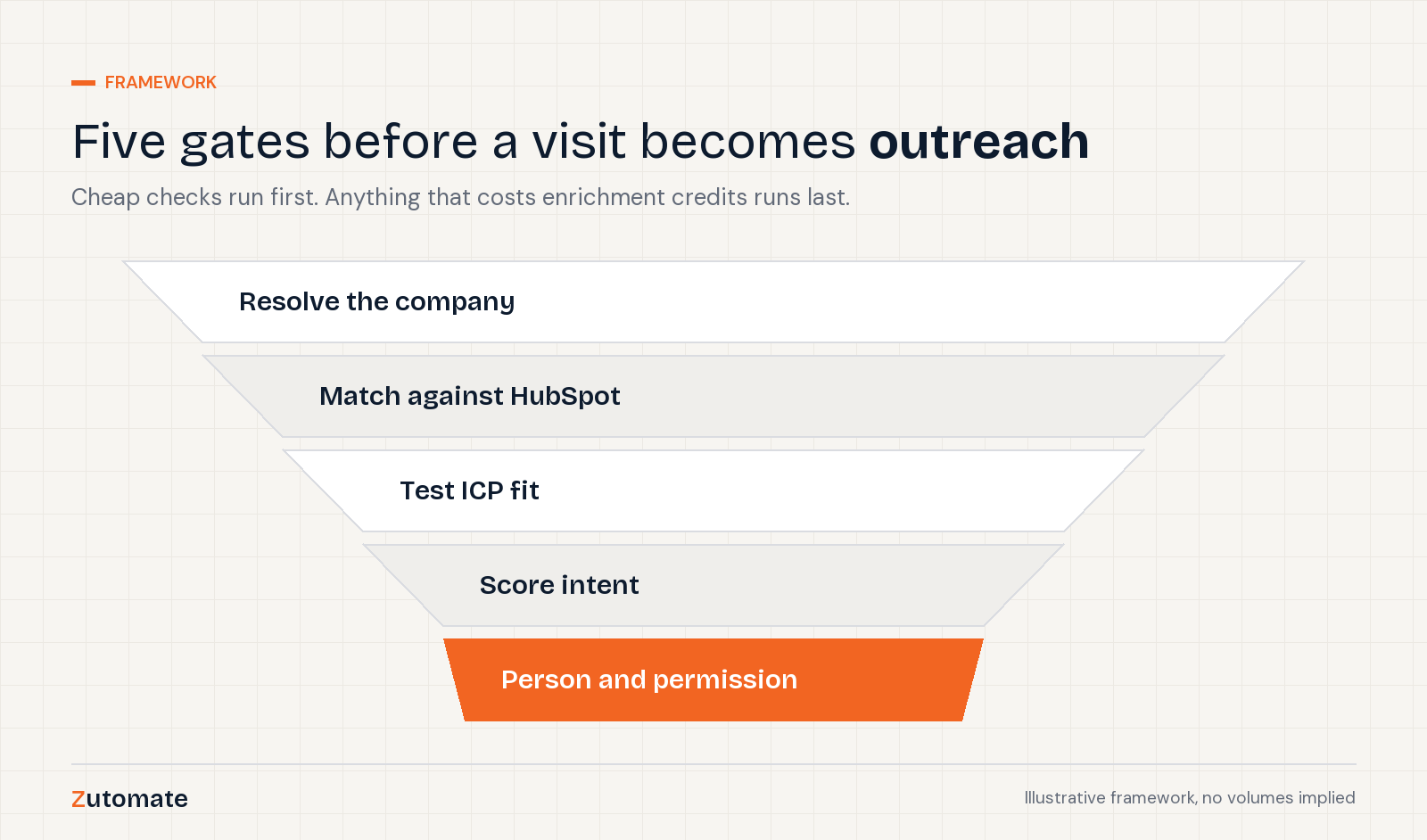
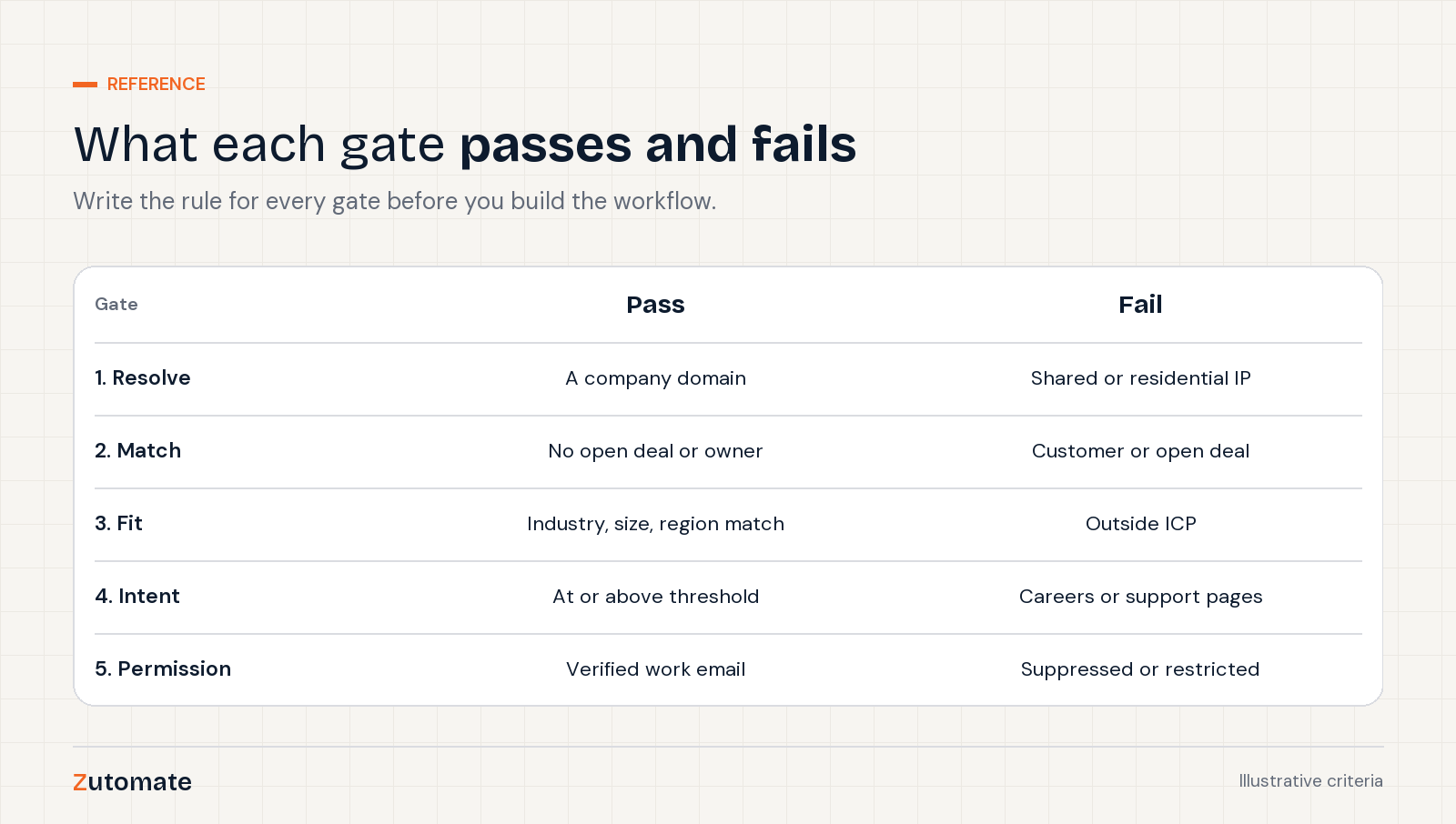
The five-gate visitor filter is the order of checks a visit must pass before it becomes outreach: resolve the company, match it against HubSpot, test fit, score intent, then find the person and clear permission. Cheap checks run first. Anything that costs enrichment credits runs last.
| Gate | Question | Pass | Fail |
|---|---|---|---|
| 1. Resolve | Can we name the company? | A company domain | No domain, shared or residential IP |
| 2. Match | Does HubSpot already know them? | No customer, open deal, or active owner | Customer, open deal, recent unsubscribe |
| 3. Fit | Is it our ICP? | Industry, size, and region match | Outside ICP, competitor, agency |
| 4. Intent | Is the behavior strong enough? | Score at or above the Tier 2 threshold | Low score, careers or support pages |
| 5. Person and permission | Can we reach a right person lawfully? | Verified work email, no suppression | Unverified, suppressed, restricted region |
The order matters because of cost. Say you pay per enrichment lookup. Running fit and intent at the company level first means you only spend credits on accounts that already deserve a human.
How do you build it in HubSpot, step by step?
You build it in six steps: capture, stage, match, score, write, and act. The idea is simple. Raw visits live in a staging table, and only qualified people reach HubSpot.
Step 1: Capture visits and resolve them to companies
Install the identification pixel and send each visit's company domain, page URLs, timestamps, session count, and UTM source to a staging table. Don't create HubSpot contacts from raw hits. One busy week can bury your CRM in records nobody owns.
Step 2: Stage and aggregate in Clay
Roll visits up to one row per company domain per week, with a page list and a session count. This is also where you set a "first seen" and "last seen" date. If you don't run Clay, a Google Sheet and a Zapier or Make step can play the same role, with more manual care.
If you want the staging layer built properly, that's what our Clay implementation service covers.
Step 3: Match against HubSpot before anything writes
Look up each domain in HubSpot first. Check whether the company exists, its lifecyclestage, whether it has an open deal, and who owns it. A visit from an existing customer is not a prospecting signal. It's an account-management signal, so route it to the owner as a note and skip the sequence.
This is the step most competitor guides skip, and it's where cold-looking emails to current customers come from.
Step 4: Check fit and score intent
Fit is a yes or no against your ICP. Intent is a score. Run fit first, then score only the survivors.
Here is an illustrative starting model. The weights are our suggestion for a first pass, not a benchmark, so tune them against your own meetings booked.
| Behavior | Points |
|---|---|
| Pricing or booking page visit | 40 |
| Comparison or alternatives page | 30 |
| Two or more sessions in seven days | 20 |
| Case study or service page | 15 |
| Blog post only | 5 |
| Careers or support page | Suppress |
Set Tier 1 at 60 or more, Tier 2 at 30 to 59, and everything below as no outreach. A pricing visit plus a return session lands at 60, which is Tier 1.
Step 5: Find the person, verify, then write to HubSpot
Only now do you look up a contact. Search for the role that owns the problem, not whoever happens to be on the visitor list, since the visitor is often a researcher and not the buyer. Verify the email before the write, because a skipped row in Clay is easier to fix than a bounced address in HubSpot. Our Clay-to-HubSpot enrichment workflow covers the dedupe and failed-write handling in detail.
Create or update the contact, match companies on domain, and write these properties:
| Property | Type | Used for |
|---|---|---|
visitor_source | Dropdown | Which tool surfaced the visit |
visitor_first_seen | Date | Start of the signal window |
visitor_last_seen | Date | Recency, cool-off logic |
visitor_key_pages_7d | Number | Count of high-intent page hits |
visitor_intent_score | Number | Tiering |
visitor_tier | Dropdown | Tier 1, Tier 2, Tier 3, Suppressed |
visitor_suppress_reason | Dropdown | Why a record was blocked |
lifecyclestage | Standard | Set only if your lifecycle rules allow it |
hubspot_owner_id | Standard | Set by your routing rules |
The visitor_ names are our convention. Rename them to fit your own scheme. If routing is shaky, run our HubSpot lead routing audit checklist first, because a perfect signal with no owner goes nowhere.
Step 6: Let a HubSpot workflow pick the play
A workflow reads visitor_tier and does the work. The tier decides the play.
| Tier | Play | Owner | Timing we'd aim for |
|---|---|---|---|
| Tier 1 | Task for the owner, then a short personal email, then a sequence if no reply | Account owner | Within one business day |
| Tier 2 | Enroll in a short sequence with a signal-specific first email | Sequence sender | Within two business days |
| Tier 3 | No outreach. Keep the company-level signal for ads and nurture | Marketing | None |
| Suppressed | Log the reason on the record | None | None |
Set exit rules on day one. HubSpot unenrolls a contact when they reply or book a meeting through a sequence link, and you can configure that behavior. Add a cool-off period too, say 90 days after the last touch, so one visit doesn't restart the same sequence every month.
What should the first email say?
It should name the problem the page answers, not the fact that you watched the visit. "I saw you on our pricing page" is accurate and still creepy. Start from the situation instead.
Subject: Question about [problem the page addresses]
Hi {first_name}, I'm [name] at [Company]. We help [ICP] with [outcome]. Teams like [company type] usually look at this when [trigger situation]. Is [specific problem] on your plate this quarter? If not, tell me and I'll close the loop.
Avoid fill-in-the-blank placeholder tokens in sequences that a workflow enrolls. HubSpot's documentation says those can't be set before enrollment and may appear in the sent email, so use real contact properties for personalization.
How many visitors actually become sequences?
Very few, and that's the point. Here's an illustrative funnel for a site with 5,000 monthly visitors. Every rate below is an assumption we picked to show the shape, not a benchmark.
| Stage | Assumption | Count |
|---|---|---|
| Monthly visitors | Given | 5,000 |
| Known through forms | 2% of visitors | 100 |
| Resolved to a company | 15% of visitors | 750 |
| Pass match (no customer or open deal) | 80% | 600 |
| Pass ICP fit | 40% | 240 |
| Pass intent threshold | 20% | 48 |
That's roughly 48 accounts a month worth a person's time. A tool that promises to email every visitor would send 750 emails instead, most to people with no reason to talk. Measure your own funnel for a month before you trust any of these ratios.
Where does inbound-led outbound break?
It breaks at identification, at duplicates, at permission, and at HubSpot's own enrollment rules. Know these before you launch.
Identification is partial. Match rates depend on your traffic, your region, and the tool. Shared offices, VPNs, and remote workers blur company-level matches. Expect gaps and don't promise leadership a number you haven't measured.
Duplicates multiply. The same person can arrive through the pixel, a form, and a list. Match on email for contacts and domain for companies before every write, and run a weekly duplicate check.
Permission varies by region. Person-level identification and cold email are regulated differently across the US, the UK, and the EU. We're not lawyers, so have yours review the data processing terms of whichever tool you use, and add a region gate before the person lookup.
Deliverability still applies. New contacts bounce at higher rates than warmed ones. Verify addresses and follow Google's email sender guidelines if you send in volume. Our cold email infrastructure checklist covers sender setup.
HubSpot enrollment has rules. These are the ones that bite, as of November 2026:
| Rule | What HubSpot says | Source |
|---|---|---|
| Plan tier for workflow enrollment | The "Enroll in sequence" workflow action needs Sales Hub or Service Hub Enterprise. Professional can enroll from the sequence's Automation tab only | HubSpot Knowledge Base |
| One sequence at a time | A contact can sit in one sequence at once, and a paused enrollment still blocks another | Same page |
| Sender requirements | The sender needs a connected inbox and an assigned seat. If they hit their daily limit, the contact isn't enrolled | Same page |
| Auto-unenroll | Replies and meeting bookings unenroll a contact by default, and you can change it | HubSpot sequences guide |
| Bulk enrollment | The page advises against using the workflow action for large enrollments and mentions a 100-contact guideline | Same page as the first row |
Re-check this table before you publish. HubSpot changes plan features often.
If you're on Professional, the practical build is a Tier 1 task for the owner plus manual or Automation-tab enrollment, with the workflow handling tiering and alerts.
How do you know it's working?
Track four numbers: visitor-to-meeting rate by tier, reply rate against your cold baseline, suppression rate, and bounce rate. If Tier 1 doesn't beat your cold outbound meeting rate within a quarter, fix your gates before you change your copy.
Don't copy reply-rate claims from vendor blogs. Several we reviewed cite ranges with no source, and some contradict themselves within one page. Your own baseline is the only number that counts.
Results depend on your offer, your ICP, and your data quality. Treat any benchmark as a reference point, not a target.
Key Takeaways
- Inbound-led outbound starts from a buying signal on your own site, so it acts on visitors who researched but never filled in a form.
- Run five filters in order: resolve the company, match against HubSpot, check ICP fit, score intent, then find and verify a person.
- Enrichment credits should be spent last, after fit and intent have already narrowed the list to accounts worth a human's time.
- Match every visit against HubSpot first, because a visit from an existing customer or open deal is an account-management signal and not a prospecting one.
- HubSpot's "Enroll in sequence" workflow action needs Sales Hub or Service Hub Enterprise as of November 2026, and a contact can be in only one sequence at a time.
Frequently Asked Questions
What is inbound-led outbound?
It's outbound contact triggered by a signal from your own marketing, such as a pricing page visit, instead of a cold list. The signal tells you when to reach out, and the CRM tells you whether you should.
How do I connect website visitor data to HubSpot?
Stage the visits outside HubSpot, aggregate them by company domain, match against existing HubSpot records, and write only qualified contacts with source, score, and tier properties. Skip direct pixel-to-HubSpot pushes of raw hits, because they flood the CRM with unowned records.
Which website pages show the strongest intent?
Pricing, demo or booking, and comparison pages show the strongest intent. Repeat sessions within a week add weight. Blog-only visits, careers pages, and support pages are weak or irrelevant signals.
Should website intent trigger an email automatically?
Only for accounts that pass the match, fit, and permission gates, and usually only after a human or a rule has checked the tier. Fully automatic emails to every identified visitor produce bounces, complaints, and emails to existing customers.
How do you prevent duplicate records?
Match companies on domain and contacts on email before every write, and keep a staging table so nothing reaches HubSpot without a lookup. Run a weekly duplicate report to catch what slips through.
Want this built and maintained for you? Book your strategy call and we'll map your site signals to a working HubSpot flow.